Persistent ML Inference Queues with SQLite (When Redis Is Overkill)
Why SQLite handles 90% of ML inference queueing workloads — schema, atomic-claim pattern, stuck-process detection, and when to actually graduate to Redis or RabbitMQ.
The default queueing reach for most ML systems is Redis. For workloads under about 1,000 predictions per hour with persistence needs and on-prem constraints, SQLite handles it with one file and no extra infrastructure. Here's the schema, the atomic-claim pattern, the stuck-process watchdog logic, and the actually-useful threshold for graduating to something heavier.
When we started shipping desktop ML systems to clinical sites, the first design question wasn't about the model. It was about the queue.
Inference for a single chest X-ray takes a few hundred milliseconds. Multi-model orchestration runs longer. The frontend wants to submit, get an immediate acknowledgment, and stream results back as they complete. The backend has to survive process crashes, host reboots, model reloads, and the occasional radiologist who closes the app mid-prediction. Studies that were in-flight can't disappear.
That's a queue. The reflex answer is Redis with a Python worker. For our workload — on-prem deployment, single-host, no Redis hosting option, ~1,000 predictions per hour, one app per workstation — Redis was overkill. SQLite, used carefully, did everything we needed with one file and zero additional services.
This post is the writeup of how we did it, what the schema looks like, and the patterns that matter.
A note before we get into it: this work was done with my colleague Abhijay, with technical guidance from the broader engineering team at 5C Network. I'll use "we" for the system itself and "I" for specific debugging moments and personal observations.
Why a queue at all
A queue is doing four jobs in this system:
- Decoupling submission from processing. The frontend posts a study, gets back an ID, and can immediately let the user move on while inference runs in the background.
- Persistence. If the worker crashes or the host reboots, queued and in-flight jobs need to survive. A clinician should not need to re-submit because the application restarted.
- Ordering and backpressure. Multi-second inference + many concurrent users means jobs can queue up. The system needs to process them in submission order, not get overwhelmed, and shed gracefully if it can't.
- Status streaming. The frontend needs to know when a job moves from
pendingtoprocessingtocompleted, so it can render progress and final results without polling aggressively.
Almost any queue system does the first three. The fourth, in our setup, is handled with server-sent events fed by status changes in the queue — but the queue is the source of truth.
Why SQLite, not Redis
The trade is real and not always in SQLite's favor. Here's the framing that mattered for us:
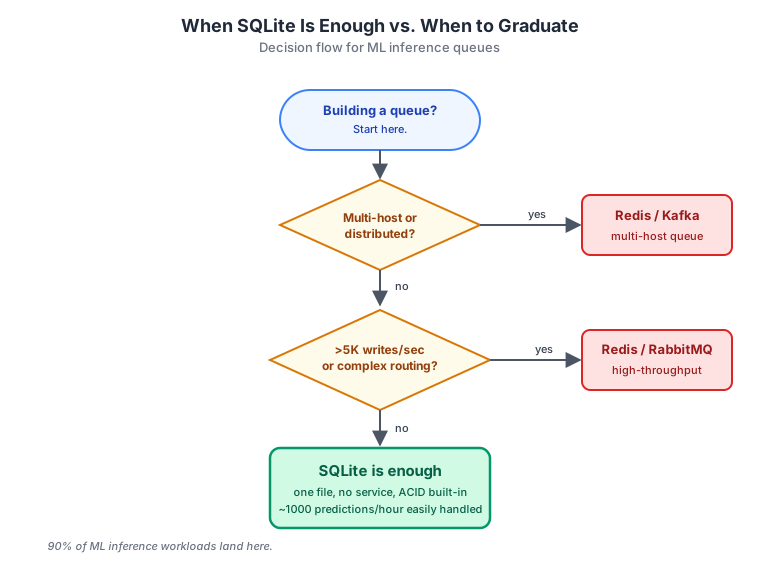
Three constraints made SQLite obviously right for this system:
On-prem, single-host deployment. Each install ships to one hospital workstation. There's no central infrastructure to coordinate with. Redis would need to either run as a sidecar (more complexity per install) or be hosted somewhere reachable from inside the hospital network (often impossible — many sites firewall outbound traffic aggressively). SQLite ships as a file. No service, no port, no cluster.
Throughput well under SQLite's ceiling. SQLite in WAL mode can handle thousands of write transactions per second on commodity hardware. Our workload is ~1,000 predictions per hour, which is comfortably two orders of magnitude under that ceiling. We are not the workload SQLite-as-queue critics warn about.
Operational simplicity. Backup is cp jobs.db jobs.db.bak. Inspecting state is sqlite3 jobs.db and you're in a SQL shell. Debugging a stuck system means looking at one file, not correlating logs across services. For a desktop product that's installed and forgotten about, this matters more than peak throughput.
When SQLite isn't enough — multi-host, >5K writes/sec, complex routing topologies — we'd move. But for ML inference on a single workstation, treating SQLite as a queue is one of those moves that feels slightly wrong until you've done it once and realized how much complexity it removes.
The schema
Two tables. One for jobs, one optional for per-pathology results that workers write incrementally.
CREATE TABLE jobs (
    id           INTEGER PRIMARY KEY AUTOINCREMENT,
    payload      TEXT    NOT NULL,                -- serialized input metadata
    status       TEXT    NOT NULL DEFAULT 'pending'
                  CHECK(status IN ('pending', 'processing', 'completed', 'failed')),
    created_at   INTEGER NOT NULL,
    claimed_at   INTEGER,
    completed_at INTEGER,
    worker_id    TEXT,
    attempts     INTEGER NOT NULL DEFAULT 0,
    last_error   TEXT
);

CREATE INDEX idx_jobs_pending_order ON jobs(status, created_at)
    WHERE status = 'pending';

CREATE INDEX idx_jobs_processing_claim_time ON jobs(status, claimed_at)
    WHERE status = 'processing';
A few notes on the choices:
payloadisTEXTholding serialized JSON, not binary. SQLite handles binary fine, but text payloads make debugging trivial — you can read them in a SQL shell.statusisTEXTwith aCHECK, not an enum lookup table. SQLite doesn't enforce foreign-key integrity the same way Postgres does, and theCHECKconstraint is enough to catch typos. Keep it simple.- The partial indexes matter. Most queries against this table want either "give me the next pending job" or "find me stuck processing jobs." Partial indexes on those specific predicates make those queries O(log n) regardless of how many completed jobs accumulate. Without them, scans get slower as
completedrows pile up.
Run SQLite in WAL mode at connection time:
conn = sqlite3.connect("jobs.db")
conn.execute("PRAGMA journal_mode=WAL;")
conn.execute("PRAGMA synchronous=NORMAL;")  # safe + faster than FULL
conn.execute("PRAGMA busy_timeout=5000;")    # 5s retry on lock contention
WAL allows readers to proceed concurrently with one writer. synchronous=NORMAL is the right balance for queueing: durable enough that a power loss won't corrupt the DB, fast enough that commits aren't your bottleneck.
The atomic claim
The single trickiest part of any queue-on-a-database setup is making sure two workers don't claim the same job. The textbook race condition: worker A selects "pending" jobs, worker B selects "pending" jobs, both update job 42 to "processing." Now job 42 runs twice.
SQLite's UPDATE ... RETURNING in a single statement is atomic at the database level. One worker wins, the other gets nothing, no race:
def claim_next_job(conn, worker_id: str):
    cursor = conn.execute("""
        UPDATE jobs
        SET status = 'processing',
            claimed_at = strftime('%s', 'now'),
            worker_id = ?,
            attempts = attempts + 1
        WHERE id = (
            SELECT id FROM jobs
            WHERE status = 'pending'
            ORDER BY created_at ASC
            LIMIT 1
        )
        RETURNING id, payload, attempts;
    """, (worker_id,))
    row = cursor.fetchone()
    conn.commit()
    return row  # None if no pending jobs
Three things to notice:
- The inner
SELECTpicks one job, the outerUPDATEflips its status and returns the row, all in one transaction. attemptsincrements on every claim — useful both for stuck-process logic (we'll get to that) and for retry caps.- No
BEGIN/COMMITboilerplate beyond the implicit transaction wrapping the single statement. SQLite's default behavior here is exactly what you want.
This pattern is the heart of the queue. If you have it right, everything else is cosmetic.
The state machine
Jobs move through a small set of states. The transitions are clean, but each one carries enough metadata that the worker, the watchdog, and the frontend can all coordinate without reaching for any other system.
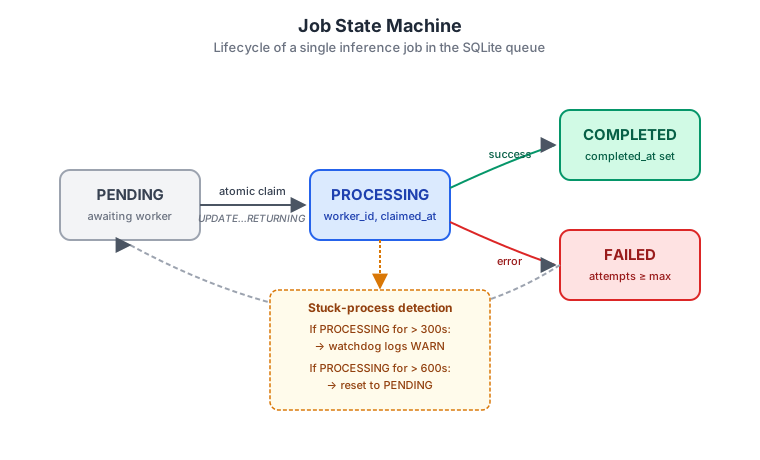
Worth flagging two transitions that don't get enough discussion:
processing → pending (via the watchdog). This is the reset path for stuck jobs. A worker that died mid-inference leaves a row stuck in processing forever unless something resets it. The watchdog does that, with timing rules I'll walk through in the next section.
failed → pending (retry). A failed job isn't necessarily permanently failed. Transient errors (OOM during inference, momentary GPU contention, a model that wasn't yet fully loaded into memory) deserve a retry. We bump attempts on every claim; if attempts < max_attempts and the failure looks transient (based on the last_error text), the watchdog requeues. Past max_attempts, the job stays failed and surfaces to the operator.
Stuck-process detection
The mode SQLite-as-queue blog posts usually skip. In production, the most common failure isn't "the queue is too slow." It's "a worker hung on one bad input and now everything queues behind it forever."
Our watchdog runs every 60 seconds and applies a two-tier policy:
def watchdog_pass(conn):
    now = int(time.time())

    # Tier 1: warn on jobs processing for > 300 seconds
    stuck_warn = conn.execute("""
        SELECT id, worker_id, claimed_at
        FROM jobs
        WHERE status = 'processing'
          AND (? - claimed_at) > 300
          AND (? - claimed_at) <= 600
    """, (now, now)).fetchall()
    for job in stuck_warn:
        logger.warning(
            f"Job {job['id']} stuck on worker {job['worker_id']} "
            f"for {now - job['claimed_at']}s"
        )

    # Tier 2: reset on jobs processing for > 600 seconds
    conn.execute("""
        UPDATE jobs
        SET status = 'pending',
            claimed_at = NULL,
            worker_id = NULL,
            last_error = 'reset by watchdog: exceeded 600s'
        WHERE status = 'processing'
          AND (? - claimed_at) > 600
    """, (now,))
    conn.commit()
The two thresholds (300s warn, 600s reset) are workload-specific. For us, a single inference cycle runs end-to-end in 30–60 seconds on the worst inputs; anything past 5 minutes is unambiguously stuck. Tune the numbers to roughly 5× and 10× your p99 inference latency and you have reasonable defaults.
Subtle thing worth saying out loud: the watchdog doesn't kill the worker. It only resets the row in the queue. If the worker is genuinely hung (deadlocked, stuck on a syscall), it's still running and consuming memory. Killing the OS process is a separate concern, usually handled by a parent supervisor (systemd, an Electron main process, etc.) that watches PIDs and restarts dead workers.
The two layers are different jobs:
- Watchdog → makes sure no work is permanently lost in the database.
- Process supervisor → makes sure no hung worker permanently consumes resources.
Most production-grade incidents I've seen come from systems that had only one of these and assumed the other was implicit. Both are needed.
Architecture in one picture
Four components, one file:
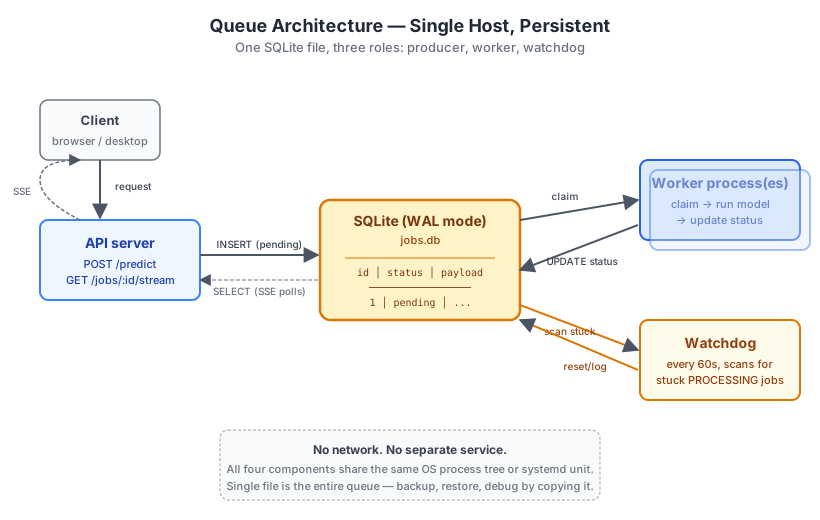
- The API server writes new jobs in (
INSERT ... status='pending') and serves SSE streams to clients by polling for status changes on a job ID. - The worker process atomically claims the next pending job, runs inference, writes results back, marks
completedorfailed. - The watchdog periodically scans for stuck jobs and resets them.
- The SQLite file is the only shared state. No network. No separate service. All four roles can run as threads inside one process, or as separate OS processes coordinated by systemd — the queue logic is unchanged.
For larger deployments we run the worker as a separate process so a crashed worker doesn't take the API server with it. For smaller installs, they're threads in the same process. Either way the queue code doesn't know or care.
SSE on top
The same status changes that drive the watchdog feed the live UI. When a frontend opens a long-lived SSE connection on /jobs/:id/stream, the API server polls the jobs row for that ID at a low frequency (every 250ms while it's pending or processing, then closes the stream on completed/failed). Each status change emits an event.
Polling SQLite at 250ms per connection sounds wasteful — it isn't. SQLite reads in WAL mode are cheap (microseconds) and don't block writers. We measured tens of concurrent SSE clients without measurable impact on inference throughput.
A dedicated change-notification system (LISTEN/NOTIFY in Postgres, Redis pub/sub, etc.) would be cleaner if you have one available. For a single-host deployment, polling a memory-mapped SQLite file is below the noise floor.
A longer post on SSE-vs-WebSockets for ML inference is on the writing list — for now, the key point is that the queue's status column is the source of truth, and SSE is just a transport that reads from it.
Limitations and when to graduate
I've been deliberately concrete about where this design holds. Where it doesn't:
- Multi-host inference. SQLite is a single-file, single-host database. If you need workers on multiple machines pulling from the same queue, SQLite cannot do that. Use Redis, Kafka, or RabbitMQ. (Network-mounted SQLite over NFS works in principle but breaks WAL guarantees in practice. Don't.)
- Throughput beyond ~10K writes/sec. You'll start contending on the single-writer ceiling. For ML inference specifically, this is rare — inference itself is the bottleneck long before the queue is.
- Complex routing. Topic-based dispatch, dead-letter queues, fan-out to multiple consumers — RabbitMQ does these natively. You can build them on SQLite, but at some level of complexity you're reimplementing a message broker badly.
- Cross-language workers. SQLite has clients in every major language, but operational debuggability is much better if everything reading the file uses the same language. Polyglot consumers are easier with a network protocol.
If you're hitting any of these, the SQLite approach is no longer enough. Treat the move to Redis (or similar) as deliberate, not as a default.
Practical takeaways
A short list, since this post is already long enough:
- Default to the simplest persistent option. A SQLite file is simpler than a Redis service, which is simpler than a Kafka cluster. Pick the smallest one that meets your constraints.
- The atomic-claim pattern (
UPDATE ... RETURNINGinside one statement) is the heart of the design. Get it right and everything else falls into place. - Always have a watchdog. A queue without stuck-process detection is a queue with a future incident.
- Separate the watchdog from the process supervisor. They solve adjacent problems and you need both.
- Use WAL mode. Non-negotiable for any SQLite workload that has both readers and writers.
- Partial indexes on
statusare your friend. Without them, table scans degrade as completed jobs accumulate.
If you're building an ML inference queue this week and reaching for Redis by default — pause and ask whether SQLite would do the job. For a surprising share of workloads, the answer is yes, and the operational savings are real.
Part of an ongoing series on production medical imaging engineering. The companion Windows-installer deep-dive is here; the year-one reflection is here.