Grad-CAM for Medical Imaging: Reading a Heatmap on a Pediatric Chest X-ray
How Grad-CAM works in thirty lines of PyTorch, what it tells you on a chest X-ray, and the failure mode every medical-imaging engineer should know.
Grad-CAM produces a heatmap over an input image showing which regions most influenced a model's prediction for a particular class. It does this by taking the gradient of the class score with respect to the activations of a chosen convolutional layer, using channel-averaged gradients as weights, and combining them into a single 2D map.
Why you need it
Test accuracy doesn't tell you why a model predicted what it did, and in medical imaging that matters more than in most domains. A CXR classifier with 92% AUC on a held-out test set might be reading the marker token, the chest tube, the exposure setting, or the diaphragm position — not the pathology. It will keep being right on data drawn from the same distribution, and start being wrong as soon as the distribution shifts.
Grad-CAM is the cheapest attribution method that gives you a useful answer to "what was the model actually looking at?" It is about thirty lines of PyTorch, costs one forward and one backward pass per image, and runs on the same hardware you trained on. There are better methods (HiResCAM, integrated gradients) and there are worse ones. Grad-CAM is the right default for routine debugging.
How it works
Four steps. Pick a target class — usually the one the model predicted, but you can attribute any class. Pick a layer — almost always the last convolutional block, because by that point each channel responds to a recognizable concept. Do a forward pass to get activations at that layer plus the class score, then a backward pass from the class score back to those activations.
Then: take the spatial mean of the gradients to get one weight per channel. The intuition is that the gradient tells you, for each channel and each spatial position, how much a small change in that activation would change the class score. Averaging over spatial positions gives "how much does this channel matter overall for this class on this input." Combine: weighted sum of activations across channels, ReLU (we only care about positive contributions), upsample to input size.
In code:
def gradcam(model, x, target_class, target_layer):
    activations, grads = {}, {}
    def fwd(m, i, o): activations["a"] = o
    def bwd(m, gi, go): grads["g"] = go[0]
    h1 = target_layer.register_forward_hook(fwd)
    h2 = target_layer.register_full_backward_hook(bwd)

    x = x.unsqueeze(0).requires_grad_(True)
    model.zero_grad()
    score = model(x)[0, target_class]
    score.backward()
    h1.remove(); h2.remove()

    a, g = activations["a"][0], grads["g"][0]   # (C, H, W) each
    w = g.mean(dim=(1, 2))                       # (C,) channel weights
    cam = (w[:, None, None] * a).sum(dim=0).clamp(min=0)
    cam = (cam - cam.min()) / (cam.max() - cam.min() + 1e-8)
    return cam   # (H, W); upsample externally to input size
That is the entire method. Running it at earlier conv layers technically works, but the resulting heatmaps respond to low-level features (edges, textures) rather than recognizable concepts, so they are harder to read.
Where it shines, where it breaks
CNNs trained for texture-rich pathology — consolidation, effusion, infiltrate — often produce Grad-CAMs that land on the right anatomy. Here is one from a ResNet50 fine-tuned for binary pneumonia classification on pediatric CXRs:
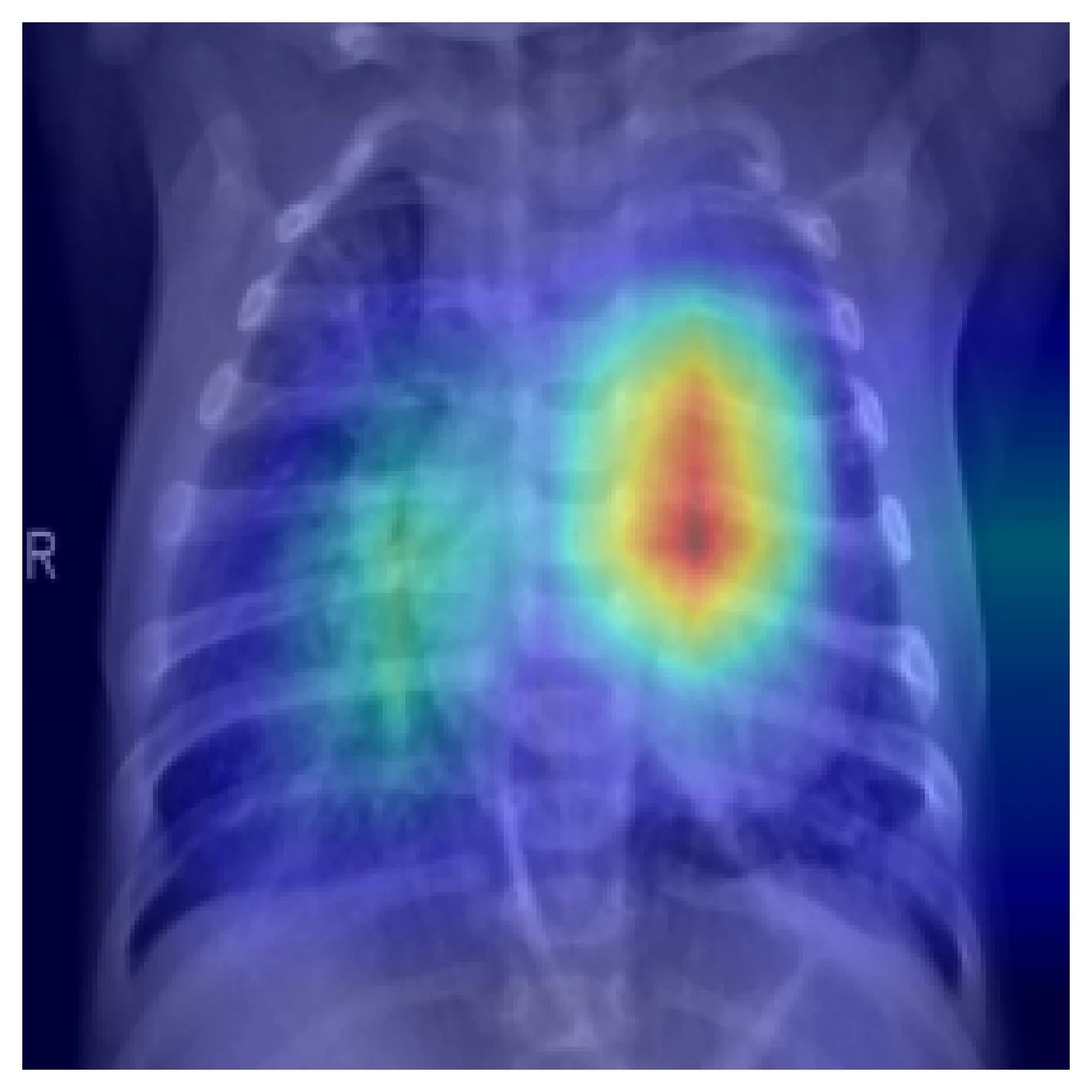
This is the result you want to see when you spot-check Grad-CAM across a sample of test cases. But it is not a guarantee. Two failure modes matter.
The model was right for the wrong reason. Trained on data with spurious correlations — side markers, tubes, exposure differences, patient positioning — a CNN will learn the shortcut. Grad-CAM will tell you. Here is the same model on a different correctly-classified pneumonia case:
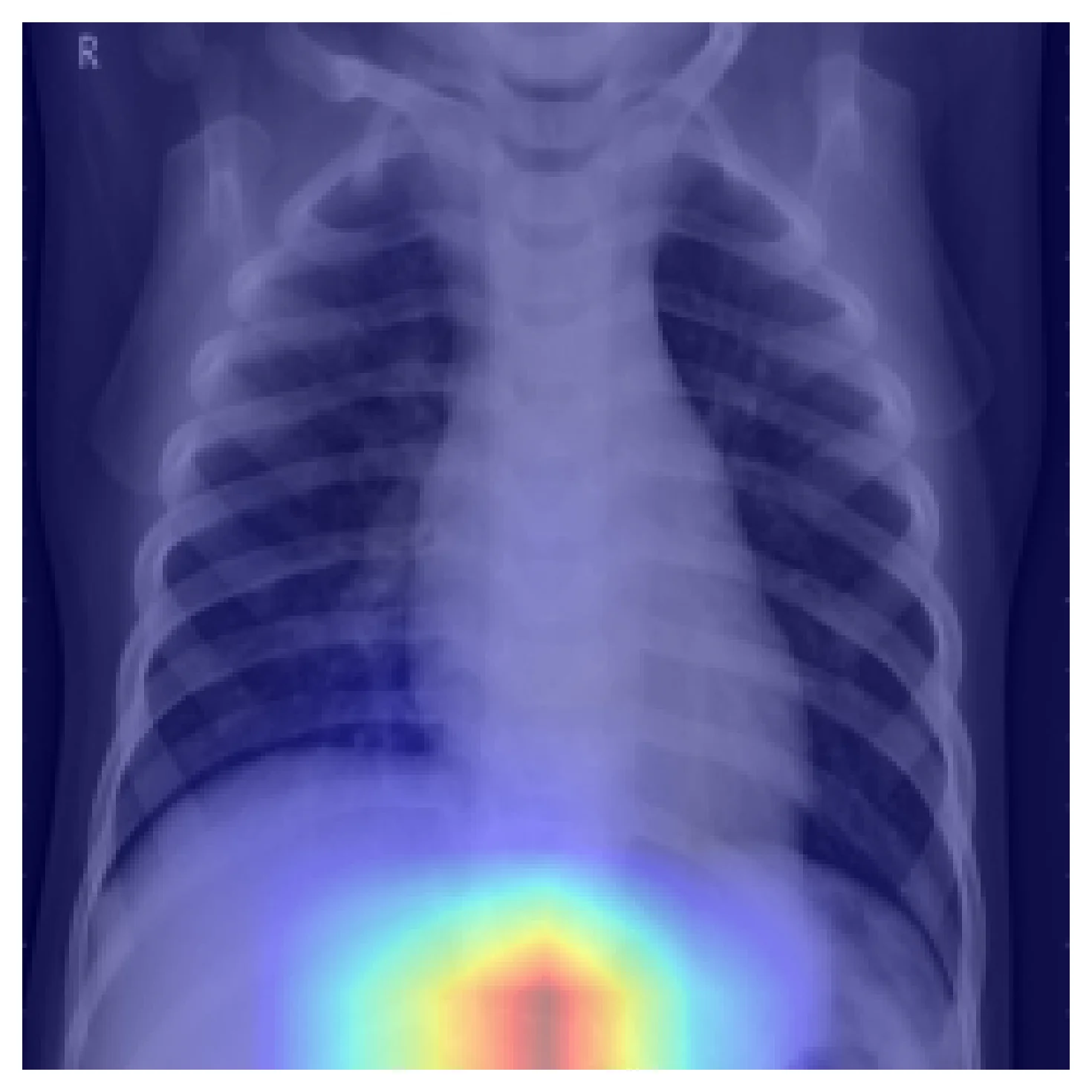
A held-out test set drawn from the same distribution would not catch this. External validation would. Grad-CAM tells you to look for it.
Grad-CAM is not segmentation. The output resolution is the spatial resolution of the chosen conv layer — for ResNet50 layer4 that's 7×7 — bilinearly upsampled to the input size. The smooth blobs above are interpolation, not pixel-precise attention. Computing IoU against a radiologist's annotation will systematically mislead you. Use Grad-CAM as a sanity check, not as a metric.
Higher-resolution alternatives exist. HiResCAM (Draelos & Carin, 2020) fixes a known faithfulness issue where Grad-CAM can highlight regions that actually move the class score in the wrong direction. Grad-CAM++ refines the weighting scheme. Integrated gradients gives pixel-level attribution. None of these are drop-in replacements; pick based on which failure mode you are trying to catch.
How this shows up in production medical-imaging engineering
Grad-CAM belongs in your validation loop, not in your hand-curated demo deck. Run it on a uniform sample of test cases — including correct predictions, not just errors — and look for systematic patterns. Is the model attending to anatomy? Is it attending to artifacts that happen to correlate with the label? Does the attention shift between patient subgroups by age, sex, scanner, or source hospital?
Don't show raw Grad-CAMs to clinicians without context. The heatmaps look like segmentations, and a clinician without ML background will read them as such. Either present them with a clear caveat about resolution and interpretation, or keep them as an internal debugging tool.
When you need finer attribution — for instance to investigate small-finding detection or to compare with annotation — switch to HiResCAM or integrated gradients. Grad-CAM is the right starting point. It is rarely the final answer.
Further reading
- Selvaraju, R. R. et al. Grad-CAM: Visual Explanations from Deep Networks via Gradient-based Localization. ICCV 2017. The original; short and readable.
- Draelos, R. L. and Carin, L. Use HiResCAM instead of Grad-CAM for faithful explanations. 2020. Identifies a faithfulness issue with Grad-CAM and proposes a fix.
- Geirhos, R. et al. Shortcut Learning in Deep Neural Networks. Nature Machine Intelligence, 2020. Why the failure case above happens, and what to do about it.