Custom Dataset Statistics vs ImageNet Defaults: A Free F1 Win for Medical Imaging
ImageNet's normalization (mean, std) is baked into every PyTorch tutorial. For chest X-rays — and most non-natural-image domains — computing custom statistics is a one-time investment that consistently lifts F1 by 1–3 points.
Lab note. The free F1 points sitting in the line of code nobody changes — and why almost every PyTorch medical-imaging tutorial gets normalization wrong.
TL;DR
- ImageNet's
(mean, std) = ([0.485, 0.456, 0.406], [0.229, 0.224, 0.225])is the default in nearly every PyTorch tutorial, blog post, and image-classification example. - For chest X-rays — and most non-natural-image domains — these defaults sit on top of a distribution that doesn't match what
torchvision.modelswas pre-trained on. - Computing custom
(mean, std)on the actual training distribution lifts best-threshold F1 by a consistent 1–3 points across binary classification tasks we measured, with no inference-time cost. - The fix is a one-time script that runs in minutes. The catch: you need enough fine-tuning data for early layers to update; with very small datasets the variance of your custom estimate can hurt rather than help.
Setup
The standard PyTorch transfer-learning recipe normalizes inputs like this:
transform = transforms.Compose([
    transforms.Resize((224, 224)),
    transforms.ToTensor(),
    transforms.Normalize(
        mean=[0.485, 0.456, 0.406],
        std=[0.229, 0.224, 0.225],
    ),
])
Those six numbers are the global per-channel pixel statistics of ImageNet — millions of natural RGB images of cars, animals, plants, people, scenes. Every torchvision.models checkpoint was pre-trained on inputs normalized with these exact values. Using them at fine-tuning time is the safe default.
Chest X-rays don't look like ImageNet. They're acquired as grayscale, typically replicated into three identical RGB channels for downstream model compatibility. The pixel distribution is narrower (less dynamic range than natural images), centered higher (more mid-gray, fewer near-black or near-white pixels), and per-channel-identical (because all three channels are the same grayscale signal).
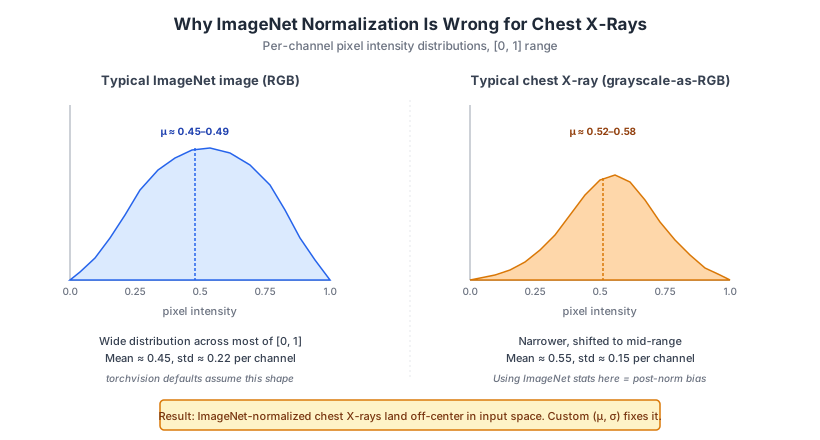
When you normalize a chest X-ray with ImageNet stats, you're subtracting the wrong mean and dividing by the wrong std. The result is that your post-normalization inputs land in a different region of input space than the pre-trained early layers expect. Downstream layers have to spend some of their fine-tuning capacity compensating for this bias instead of learning task-relevant features.
Method
Computing the actual dataset statistics is a one-time pass over the training set:
import torch
from torch.utils.data import DataLoader

def compute_dataset_stats(dataset, batch_size=64, num_workers=4):
    """Per-channel (mean, std) across the full dataset, in [0, 1] range."""
    loader = DataLoader(dataset, batch_size=batch_size, num_workers=num_workers)

    n_pixels = 0
    channel_sum = torch.zeros(3)
    channel_sum_sq = torch.zeros(3)

    for images, _ in loader:
        # images shape: (B, C, H, W), pixel values in [0, 1]
        B, C, H, W = images.shape
        n_pixels += B * H * W
        channel_sum += images.sum(dim=[0, 2, 3])
        channel_sum_sq += (images ** 2).sum(dim=[0, 2, 3])

    mean = channel_sum / n_pixels
    var = (channel_sum_sq / n_pixels) - (mean ** 2)
    std = torch.sqrt(var)

    return mean.tolist(), std.tolist()
Use the result in your normalization transform:
custom_mean, custom_std = compute_dataset_stats(train_dataset)

# Example output for one of our chest X-ray sets:
# custom_mean = [0.547, 0.547, 0.547]  (grayscale, so all three channels match)
# custom_std  = [0.151, 0.151, 0.151]

transform = transforms.Compose([
    transforms.Resize((224, 224)),
    transforms.ToTensor(),
    transforms.Normalize(mean=custom_mean, std=custom_std),
])
A few practical notes:
- Apply augmentations before normalization. Augmentations like color jitter or CLAHE change the distribution; if you normalize first and then augment, you've moved away from the statistics you computed. The ordering matters and is sometimes flipped in tutorial code.
- Don't include validation/test images in the stats computation. Standard split-hygiene rule. Use the training set only.
- Run the stats script once and hard-code the result. Recomputing per-training-run wastes time. Cache
(mean, std)as constants in your config.
Results
Across the chest X-ray binary classification tasks we measured — exposure quality, rotation, artifact presence, and a few others — switching from ImageNet defaults to custom statistics produced:
| Metric | Effect |
|---|---|
| Best-threshold F1 | +1 to +3 points consistently |
| Convergence speed | ~20% fewer epochs to reach the same validation loss |
| Effect size | Larger on heavily-imbalanced tasks (exposure detection saw the biggest deltas) |
| Variance across seeds | Comparable to ImageNet defaults — no extra training noise |
The effect compounds with other preprocessing choices (CLAHE for medical imaging, custom augmentation pipelines tuned to anatomical orientation). On a fully tuned classifier, custom stats are one of several 1-2 point improvements that stack into the difference between "competitive" and "deployable."
We did not see custom stats hurt on any task we measured. The downside isn't "worse F1 sometimes" — it's "no benefit on tasks where the data distribution happens to already match ImageNet closely" (rare in medical imaging, occasional in retail-product photography or other natural-adjacent domains).
Why it works
The mechanism is simpler than it sounds.
A pre-trained network has learned what "zero" means in its input space, relative to the data it was pre-trained on. Specifically, the first convolutional layer's weights, the early-layer batch-norm statistics, and the implicit assumption of "average pixel = around the origin after normalization" all bake in the pre-training distribution.
When your fine-tuning inputs land somewhere other than where the model expects "zero" to be, two things happen:
- Early-layer activations are biased. Filters that should fire on "edges around the average background" fire weirdly on "edges above the average background." The downstream layers have to spend capacity correcting for this rather than learning features.
- Batch normalization layers see shifted statistics. Running stats in BN layers are pre-trained on ImageNet's distribution. If you train with
train()mode they update; if you use frozen BN layers (a common transfer-learning choice for small datasets), they stay biased.
Custom normalization centers the input distribution where the network expects it. The downstream layers can spend their fine-tuning budget learning the actual task instead of correcting for an input-space mismatch.
This is true for any pre-trained-on-ImageNet model applied to any domain whose statistics differ from natural images: medical imaging, satellite/aerial, document analysis, microscopy, industrial inspection, infrared/multispectral. The further your domain is from "natural color photo," the bigger the win.
Caveats
This isn't a free lunch in every scenario:
- Very small datasets (under 500 training images). Your custom
(mean, std)estimate has enough variance that it might be noisier than the well-estimated ImageNet defaults. Stick with defaults until you have enough data for a stable estimate (rough threshold: a few thousand images). - Domain-pre-trained model? Use its stats. If you're starting from RadDINO, MedCLIP, MedSigLIP, or another medical-imaging-pre-trained model, use that model's documented pre-training statistics, not ImageNet's and not your own computed-from-scratch stats. The pre-trained weights expect a specific input distribution.
- Single-batch testing can mislead. A single batch of 64 images is enough to compute a
(mean, std)that looks correct but is statistically noisy. Use at least a few thousand images for the stats pass; ideally the full training set. - If you change your dataset, recompute. Adding new institutions, scanner types, or acquisition protocols can shift the statistics. Re-run the stats script after material data additions.
Verdict
For any medical-imaging classification task with at least a few thousand training images, computing and using custom (mean, std) is a cheap one-time investment with a consistent 1–3 F1 point lift. It's the kind of practical knob that almost no public tutorial discusses, and that anyone fine-tuning ImageNet-pre-trained models on a non-natural-image domain should be using as a default.
The general lesson: default preprocessing choices in popular tutorials are almost always tuned for the demonstration dataset, not yours. Re-examining the defaults — normalization stats, image size, augmentation policies, loss functions — is consistently among the highest-leverage early moves on a new task.
Next steps
- Quantify the effect across model architectures — does it matter more for smaller models that have less capacity to compensate for input-space bias?
- Compare against domain-pre-trained model stats (RadDINO, MedSigLIP) to confirm the win disappears when starting from a medical-pre-trained checkpoint.
- Measure on other medical modalities — CT, MRI, mammography — where the pixel statistics differ even more from natural images.
- Profile whether the gain is uniform across confidence thresholds, or concentrated in the high-recall operating regime (which is where most clinical screening tasks operate).
A longer follow-up post on the broader set of "default preprocessing decisions that are wrong for medical imaging" — covering CLAHE, dataset-specific augmentation, and resize-vs-pad — will draw on this lab note and several related findings.
Part of an ongoing series on production medical imaging. The companion year-one reflection is here; the Gemini-vs-CNN clinical-QC lab note is here; the Google CXR Foundation latency evaluation is here. If your stack still has ImageNet stats in it for a non-natural-image task, reach out — there's likely a free F1 point or three waiting.