DICOM for ML Engineers: The 20% That Covers 80% of Medical Imaging Data
What a DICOM file actually contains, the tags you'll touch, the pixel pipeline that goes wrong silently, and a robust DICOM-to-tensor function.
DICOM (Digital Imaging and Communications in Medicine) is both a file format and a networking protocol for medical imaging. For ML engineers reading from disk, only the file format matters: a binary file with a tagged-element header (metadata) and a pixel data payload. Understand those two pieces and the small set of tags that affect pixel interpretation, and you can load 80% of the medical imaging data you will encounter into a PyTorch tensor correctly.
Why it matters
Every clinical PACS stores images as DICOM. Every multi-center medical AI dataset starts as DICOM, even when the public release has been converted to JPEG or PNG. If you ever pull data directly from a hospital, a vendor, a research institution, or a recently published clinical dataset, you are reading DICOM.
The official standard is more than 5,000 pages across thirty parts. It covers the file format, the network protocol (DIMSE services), structured reporting, modality-specific extensions, and conformance statements. You do not need most of it. You need the file format, a handful of tags, and the pixel processing rules. The rest you look up when a vendor's data surprises you.
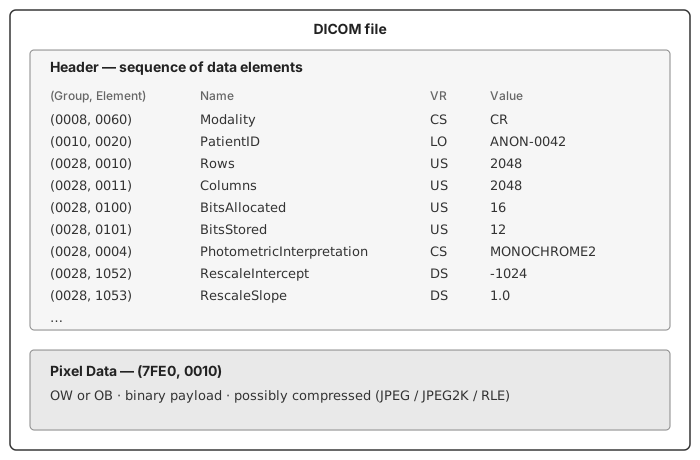
Here is the structural model:
The mechanics
Each header data element is identified by a 32-bit tag written as (Group, Element). The few that matter for pixel interpretation are listed below.
Reading with pydicom.
import pydicom
ds = pydicom.dcmread("study/CT001.dcm")
print(ds.Modality)                     # 'CT'
print(ds[0x0010, 0x0020].value)        # PatientID
print(ds.pixel_array.shape, ds.pixel_array.dtype)
Dataset behaves like a dict keyed by tag, with named attribute access for standard tags. pixel_array returns the decoded pixels as a NumPy array — though "decoded" hides a small mountain.
Tags that affect pixel interpretation.
(0028, 0010)Rows and(0028, 0011)Columns — dimensions.(0028, 0100)BitsAllocated — bits per pixel in storage (usually 16).(0028, 0101)BitsStored — bits actually used (often 12 or 14).(0028, 0103)PixelRepresentation — 0 = unsigned, 1 = two's-complement signed.(0028, 0004)PhotometricInterpretation —MONOCHROME1= max value is black;MONOCHROME2= max value is white.(0028, 1052)RescaleIntercept and(0028, 1053)RescaleSlope — linear map to modality units (Hounsfield for CT, raw intensity for X-ray).(0028, 1050)WindowCenter and(0028, 1051)WindowWidth — display hints, not ML normalization.
UIDs define a three-level hierarchy. A StudyInstanceUID contains one or more SeriesInstanceUIDs, each containing one or more SOPInstanceUIDs (individual images). For multi-image studies — CT series, MRI sequences — you read every instance in a series and stack them by InstanceNumber or ImagePositionPatient.
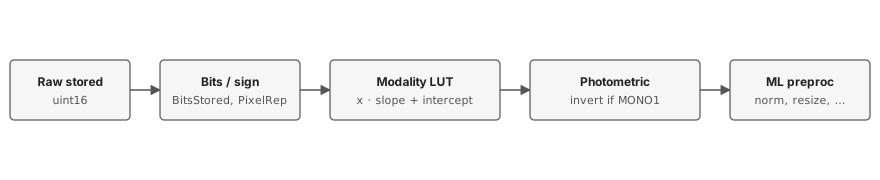
The pixel processing pipeline.
A robust loader function:
import numpy as np
import pydicom

def dicom_to_array(path):
    ds = pydicom.dcmread(path)
    arr = ds.pixel_array.astype(np.float32)

    # Modality LUT: linear rescale to physical units (Hounsfield for CT, etc.)
    slope = float(getattr(ds, "RescaleSlope", 1.0))
    inter = float(getattr(ds, "RescaleIntercept", 0.0))
    arr = arr * slope + inter

    # Photometric interpretation: invert MONOCHROME1 so that "more attenuation"
    # always maps to larger numbers, matching MONOCHROME2 convention.
    if ds.PhotometricInterpretation == "MONOCHROME1":
        arr = arr.max() - arr

    return arr, ds
That is the function you write once, validate carefully on one image per data source, and call everywhere. Window/level normalization comes after, as part of ML preprocessing — not inside this function.
One edge case worth noting separately: when BitsStored is less than BitsAllocated (e.g., 12-bit data in a 16-bit container), the high bits of each pixel should be zero, but some vendors leave garbage there. Defensive masking — arr = arr.astype(np.uint64) & ((1 << ds.BitsStored) - 1) — is harmless for unsigned data and worth adding when you encounter a noisy source. Don't apply it blindly to signed data; you'll destroy the sign bit.
Where it shines, where it breaks
DICOM's strengths are real. Pixel data is lossless by default. Metadata is rich — acquisition parameters, demographics, scanner make and model, slice positions for 3D — and standardized across vendors. The same file format spans X-ray, CT, MRI, ultrasound, and mammography.
It breaks in predictable places.
MONOCHROME1 inversion. Some CR and DX modalities store CXR as MONOCHROME1, where the maximum pixel value is black, not white. Skip the inversion in your loader and your model trains on negative-image CXRs. Validation accuracy looks reasonable on data from the same vendor; external validation looks catastrophic.
Compressed transfer syntaxes. DICOMs can be uncompressed (Explicit VR Little Endian) or compressed with JPEG, JPEG 2000, JPEG Lossless, or RLE. pydicom reads uncompressed and RLE natively; for JPEG variants you need pylibjpeg or gdcm installed. The error when you forget is unhelpful — NotImplementedError: Unable to decode pixel data — and CI only catches it if your test fixtures include compressed samples.
Vendor variation. WindowCenter and WindowWidth can be a single number or a list (multiple suggested windows). Some vendors write absent tags as zeros instead of omitting them. Some CR vendors put numeric values into string fields. Defensive coding helps; trust nothing without checking.
PHI in headers, and burned-in pixels. The header carries PatientName, PatientID, PatientBirthDate, AccessionNumber, InstitutionName, and so on. Many older CXR files also have text — patient ID, study date — rendered into the pixel data by the modality. De-identifying the header is straightforward; removing burned-in PHI requires pixel-level scrubbing and is harder.
How this shows up in production medical-imaging engineering
Preprocess once and cache. DICOM parsing is slow, especially for compressed transfer syntaxes. Production pipelines convert DICOM to a stable intermediate format — PNG, NIfTI, or a NumPy .npz with a metadata sidecar — once at ingestion, keep the DICOMs as the canonical source, and train from the cached form.
De-identify before anything leaves the clinical perimeter. The DICOM standard's de-identification profiles (PS3.15 Annex E) define what to scrub. Use a tested library rather than rolling your own; private tags are easy to forget.
Do not use WindowCenter and WindowWidth as a normalization recipe for training. They are display hints chosen by a radiologist or a vendor default — sometimes well-tuned, often arbitrary. Train on linear pixel data normalized by dataset statistics or a fixed range appropriate to the modality. Apply windowing only when generating visualizations for human review.
Validate the inversion path on every new data source. The cost of getting MONOCHROME1 wrong is silent — no exception is raised, validation accuracy stays high on same-source data — and the only protection is checking once, deliberately, when you onboard a new vendor.
Further reading
- pydicom documentation. The library you will actually use. The user guide covers reading, writing, and the dataset API.
- "DICOM is Easy" by Roni Zaharia. A blog series that explains the format from the wire level up. Older but still accurate.
- The DICOM standard. The source of truth. Read parts 3 (information objects), 5 (data structures), and 6 (data dictionary) when you need them; ignore the rest until you do.
Part of an ongoing series on production medical imaging. The CNN-components primer is here; the FPN primer is here. If you're wrestling with a DICOM corner case I missed, reach out.